Field note · architecture
How to Secure an MCP Server for AI Agents
A practical MCP server security guide covering OAuth audience checks, tool scope, sandboxing, prompt injection, SSRF, supply chain, and audit controls.
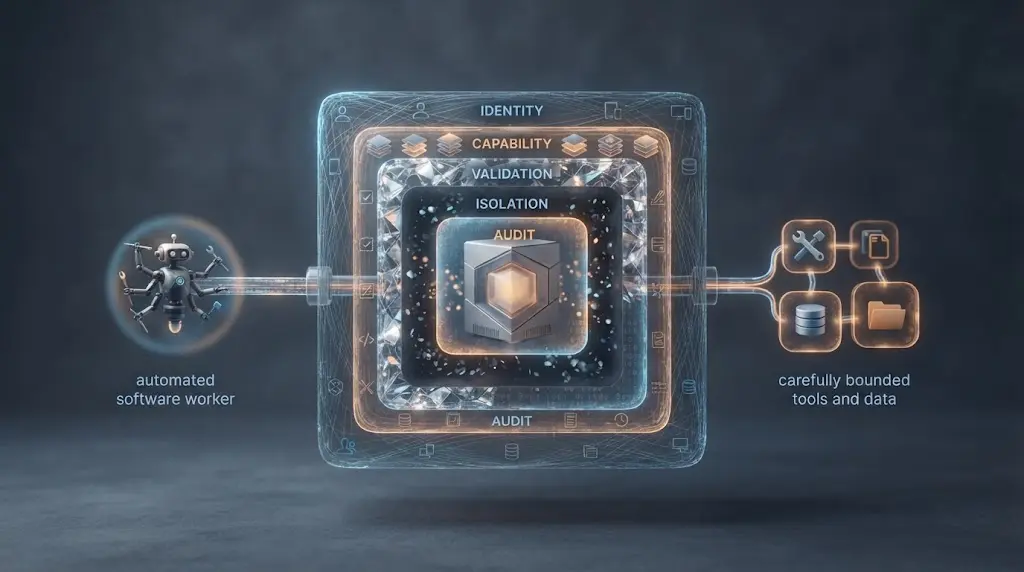
An MCP server can look like a small adapter and still hold the keys to a database, filesystem, CRM, or deployment system. The protocol standardizes how an AI application reaches tools and data, but it does not decide which user may call which tool, whether a URL is safe to fetch, or whether a tool description changed after approval (Google Cloud MCP security).
I treat MCP security as a boundary problem. First constrain the server's identity and reach. Then constrain each capability. Finally, make every action and change explainable after the fact.

What exactly are you securing when you secure an MCP server?
You are securing more than a JSON-RPC endpoint. An MCP deployment has an AI host, an MCP client, an MCP server, the tools and resources behind the server, the identity that authorizes access, and the content that travels through the model context. OWASP describes the server as a connection point with delegated permissions, dynamic tools, and chained calls. That combination makes a small server capable of producing a large side effect (OWASP's practical guide).
The first useful distinction is between protocol security and application security.
| Layer | Question | Owner |
|---|---|---|
| Transport | Can an unauthorized party reach the server or alter the connection? | Network and platform team |
| Authentication | Which human, workload, or client is making this request? | Identity team and server |
| Authorization | Is this principal allowed to call this tool on this resource with these arguments? | Server and policy layer |
| Content | Could a description, prompt, resource, or result manipulate the model? | Host, server, and application |
| Execution | What can the process read, write, execute, or call outbound? | Runtime and operating system |
| Change | Which code, dependency, schema, and tool definition is running now? | Engineering and supply-chain owners |
| Evidence | Can you reconstruct what happened without logging secrets? | Operations and security |
The protocol does not replace those owners. The current MCP specification defines transport and authorization behavior, but application policy still decides whether delete_customer, write_repository, or send_email belongs in the server at all.
An MCP server is secure only when its reachable tools, data, identity, and runtime are bounded together.
That is the unit to review. A server with perfect TLS and an unrestricted shell tool is not secure. A server with good tool schemas but a shared, over-privileged credential is not secure. A server with an OAuth login that lets one tenant read another tenant's state is not secure.
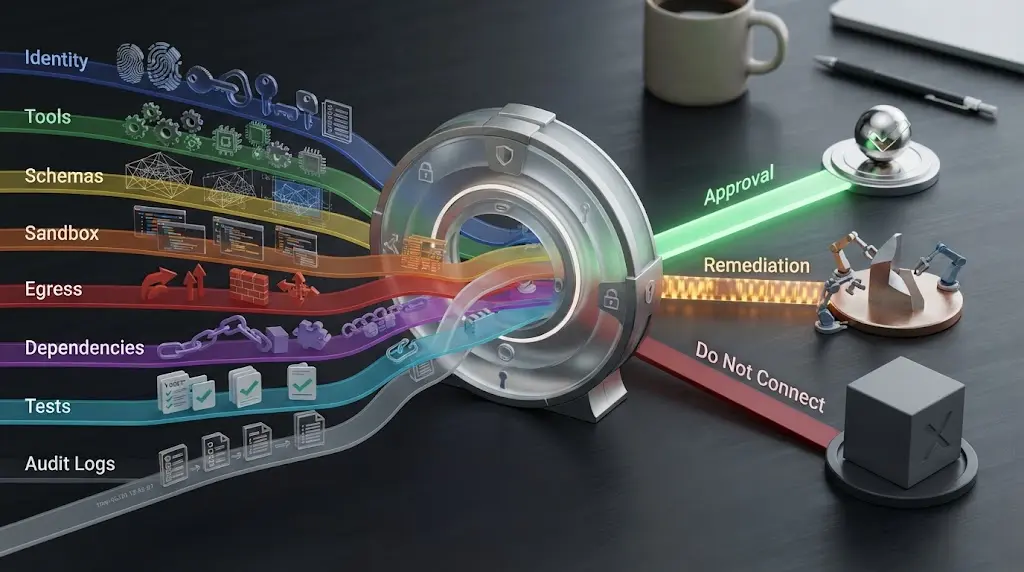
The rest of this guide uses a six-layer gate. It is my synthesis of the current MCP, OWASP, Google Cloud, and Anthropic guidance, not a published standard:
- Boundary: deployment mode, network, process, and trust zones.
- Identity: principal, token audience, tenant, and session binding.
- Capability: tools, resources, arguments, approvals, and limits.
- Content: descriptions, schemas, prompts, and results treated as untrusted data.
- Containment: sandbox, egress, SSRF, timeout, quota, and recovery controls.
- Evidence: versioned definitions, dependency review, logs, alerts, and release proof.
If one layer is missing, write down the compensating control. Do not let “the model is instructed not to do that” count as a compensating control for a missing authorization check.
Should you run the MCP server locally or remotely?
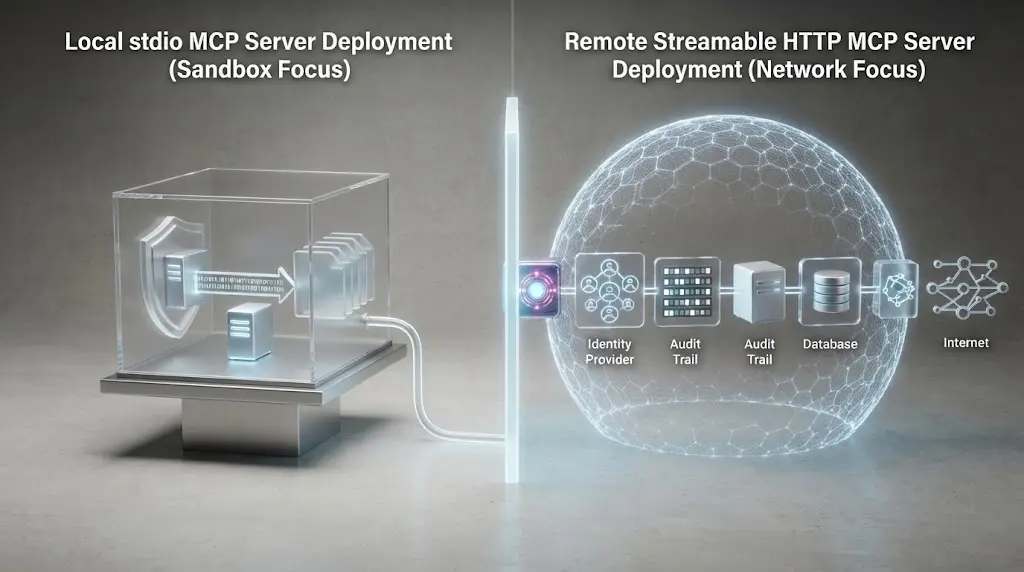
Choose local stdio when one trusted client launches a process for one user and the server needs a narrow local capability. Choose remote Streamable HTTP when several users, agents, or applications need a service boundary, centralized identity, and shared operations. The current MCP transport overview lists stdio and Streamable HTTP as standard transports (MCP Transports).
The choice changes the threat model.
| Decision | Local stdio | Remote Streamable HTTP |
|---|---|---|
| Process start | Client launches a subprocess | Server runs as a service |
| Primary boundary | Operating-system process and sandbox | Network, TLS, identity, and service policy |
| Authentication | Often inherited from the local client environment | Required for protected resources |
| Main risk | Malicious package or local process compromise | Exposed endpoint, token misuse, tenant leakage, SSRF |
| Best first control | Restrict command, files, network, and environment | Validate tokens, audience, scopes, resource, and TLS |
| Operational need | Pin executable and dependency versions | Central logs, rate limits, rotation, deployment controls |
| Common mistake | Assuming localhost means private | Treating a bearer token as complete authorization |
Local does not mean safe. A local server usually runs with the privileges of the client process unless you add a sandbox. The current MCP security guidance recommends restricted filesystem and network access, explicit privilege grants, and platform-appropriate sandboxing. It also recommends stdio for local servers when the goal is to limit access to the MCP client (MCP Security Best Practices).
Remote does not automatically mean more dangerous. A remote service can give you a clean place to enforce identity, policy, rate limits, and audit. It also creates a network endpoint that needs all of those controls before the first tool is exposed.
Use this decision rule:
- If the server only needs one user's local files, start with local
stdioand sandbox it. - If the server serves a team, use remote HTTP with per-user or per-workload authorization.
- If the server can write production data, add an authorization policy layer and approval path regardless of transport.
- If you cannot explain the process identity, network egress, data boundary, and shutdown path, do not connect the server to an agent yet.
Do not put a remote HTTP server on 0.0.0.0 with a static API key simply because a client can reach it. Make the deployment boundary a deliberate part of the design.
What should authenticate a remote MCP request?
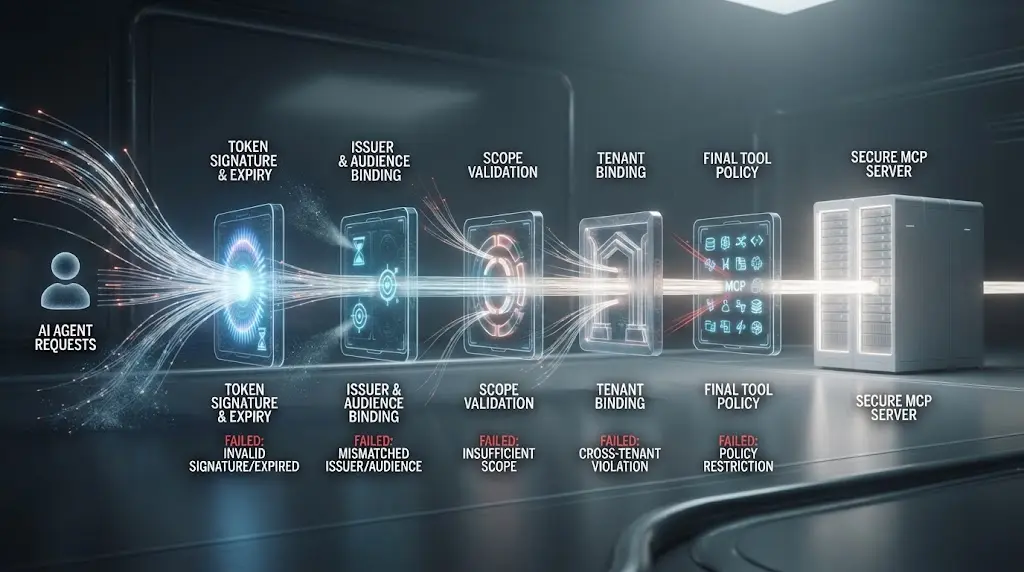
For a protected HTTP server, authenticate every request and authorize it for the actual resource. The current MCP authorization specification models a protected MCP server as an OAuth resource server and the MCP client as an OAuth client. It requires the client to identify the target MCP server when requesting a token, and it requires the server to validate that the token was issued for that server (MCP Authorization).
The security-critical detail is audience binding. A token that is valid at one resource is not automatically valid at another resource. The server must reject a token issued for a different API, even if its signature is valid and it contains a familiar user identity.
“MCP servers MUST NOT accept any tokens that were not explicitly issued for the MCP server.”
That sentence comes from the MCP Security Best Practices document. It is short, but it rules out a common shortcut: accept the token from the client, forward it to a downstream API, and let the downstream API decide what happened.
The safe request path is:
- The client identifies the canonical MCP resource when requesting authorization.
- The authorization server issues a token for that resource and the approved scopes.
- The client sends the token in the
Authorizationheader on every HTTP request. - The MCP server validates signature or introspection, issuer, expiry, audience, subject, scopes, and any tenant or workload claims it depends on.
- The server maps the authenticated principal to a policy decision for the specific tool, resource, and arguments.
- If the server calls an upstream API, it obtains or uses a separate upstream credential. It does not pass the client token through as if it were issued for the upstream resource.
The MCP specification says access tokens must not be placed in a URI query string. That matters because URLs are routinely copied into logs, traces, browser history, proxies, and error reports (MCP Authorization).
At the server boundary, reject these cases explicitly:
| Request condition | Response or action |
|---|---|
| No token on a protected endpoint | 401, with the server's authorization challenge |
| Expired, malformed, or unverifiable token | 401, no tool execution |
| Valid token for another audience | 401 or the server's documented invalid-token response, no passthrough |
| Valid identity without required scope | 403, no tool execution |
| Token is valid but tenant or resource binding fails | 403, no data returned |
| Policy service unavailable | Fail closed for protected actions |
| Upstream credential unavailable | Return a bounded error, do not fall back to the client token |
The exact HTTP error body belongs to your implementation and framework. The security property is simpler: authentication failure must happen before tool logic, and authorization failure must happen before the side effect.
A valid OAuth token is not permission to call every MCP tool.
How do you enforce least privilege at the tool boundary?
Least privilege is not one broad OAuth scope called mcp:use. It is a chain of constraints that narrows a request from principal to operation, resource, and arguments. Google Cloud recommends an agent identity with only the roles and permissions needed for its tasks. OWASP recommends minimum permissions per server and per tool, including read-only versus write access (Google Cloud MCP security, OWASP MCP Security Cheat Sheet).
Start with the smallest useful tool surface.
| Broad tool | Safer tool boundary |
|---|---|
| run_sql(query) | read_customer_orders(customer_id, date_from, date_to) |
| execute_shell(command) | run_tests(test_suite) inside a fixed workspace and time budget |
| write_file(path, content) | create_draft(document_id, content) in a drafts-only store |
| fetch_url(url) | read_approved_source(source_id) from an allowlisted catalog |
| send_email(to, subject, body, attachment) | create_email_draft(ticket_id, body) with sending kept outside the agent |
The narrower name is not the control by itself. The implementation must enforce the boundary. A tool called read_customer_orders must still verify that the authenticated principal may read that customer and that the requested date range is within policy.
Apply least privilege at five points:
- Server selection: allow only approved servers for the host, workspace, tenant, or environment.
- Tool selection: allowlist exact tool names and review additions.
- Resource selection: bind records, files, repositories, accounts, and URLs to the caller's scope.
- Argument selection: validate type, format, range, length, and cross-field relationships after normalization.
- Effect selection: separate read, draft, approve, and commit operations. Require a stronger policy for each irreversible step.
The MCP authorization specification's scope strategy is useful here. It says clients should request only the scopes needed for intended operations and supports step-up authorization when a later operation needs more scope (MCP Authorization). Do not request write access at connection time because one future tool might need it. Request or approve it for the operation that needs it.
This is the same principle covered in my guide to least-privilege access for AI-agent tools, but MCP adds two moving parts: tool discovery can change the visible capability set, and the server may be a proxy to a second authorization system. Review both boundaries.
The model may choose among permitted tools, but the server must decide whether the chosen action is permitted.
For consequential tools, bind an approval to the normalized action, not to a general conversation. Show the actor, tool, target, parameters, data leaving the system, and expiry. If any of those change, require a fresh decision.
How do you stop prompt injection and tool poisoning?
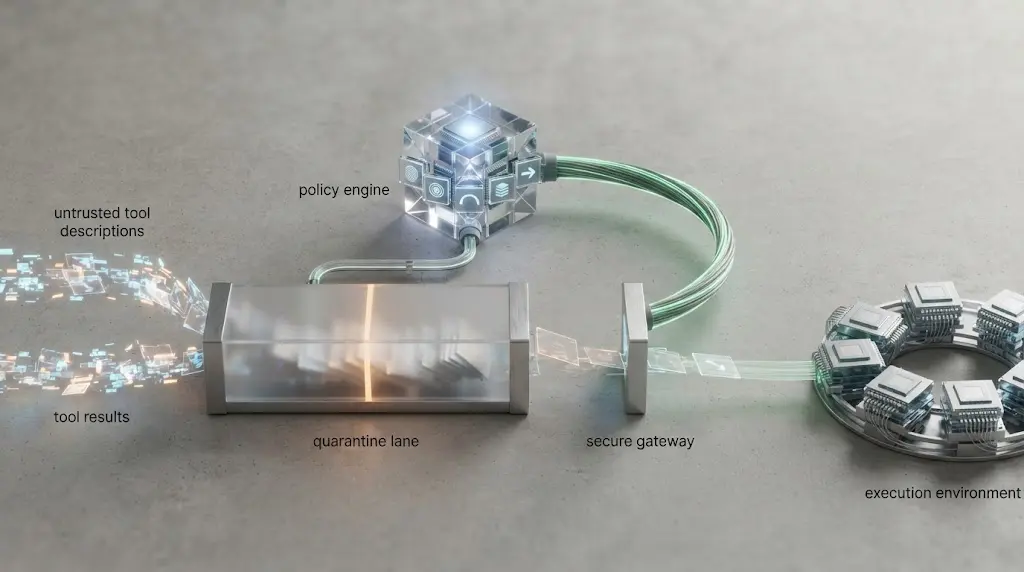
Treat every model-visible description and result as data that can influence a decision, not as a trusted policy instruction. The MCP tools specification says clients must consider tool annotations untrusted unless they come from trusted servers. OWASP lists tool descriptions, parameter schemas, and return values as injection surfaces (MCP Tools, OWASP MCP Security Cheat Sheet).
The practical attack path looks like this:
- A tool description says it should be called for a task, but also contains an instruction to reveal another server's data.
- The agent treats that description or a fetched document as a higher-priority instruction.
- The model proposes a legitimate-looking tool call with attacker-controlled arguments.
- The MCP server executes it because authorization checks only the user's identity, not the action's purpose, target, or data flow.
The server cannot solve the host's entire prompt-injection problem, but it can prevent the most damaging consequence. Keep authorization in code. Keep secrets out of model context. Keep output contracts narrow. Keep high-impact actions behind a second check.
Use these controls:
| Injection surface | Server-side control | Host or agent control |
|---|---|---|
| Tool description | Review, version, and approve descriptions; reject unexpected behavior | Treat descriptions as untrusted metadata |
| Input arguments | Schema, type, range, path, URL, and policy validation | Do not let model output bypass policy |
| Tool result | Structured output, size limits, redaction, provenance | Treat results as data, not instructions |
| Retrieved content | Allowlisted sources and content extraction | Separate data from system instructions |
| Cross-server context | Per-server and per-tenant boundaries | Review data flows between tools |
| Destructive action | Dry run, preview, explicit approval, idempotency | Show exact parameters before approval |
Google Cloud gives a concrete prompt-injection mitigation: separate user-provided or database-derived content from instructions and isolate memory and state between users, tenants, or agents (Google Cloud MCP security). Delimiters can clarify structure, but they do not authorize a delete operation. Authorization still belongs outside the model.
When a server is updated, compare the old and new tool inventory. A new tool, new parameter, broader description, changed output type, or changed outbound dependency should create a review event. Anthropic's directory policy makes the same trust point in product terms: descriptions should narrowly and accurately match actual functionality (Anthropic MCP Directory Policy).
Do not promise that prompt injection is “prevented.” A safer claim is that the server limits the authority an injected instruction can exercise. For a deeper agent-level treatment, see how to prevent prompt injection in an AI agent. The MCP server section should remain about blast-radius reduction and policy enforcement.
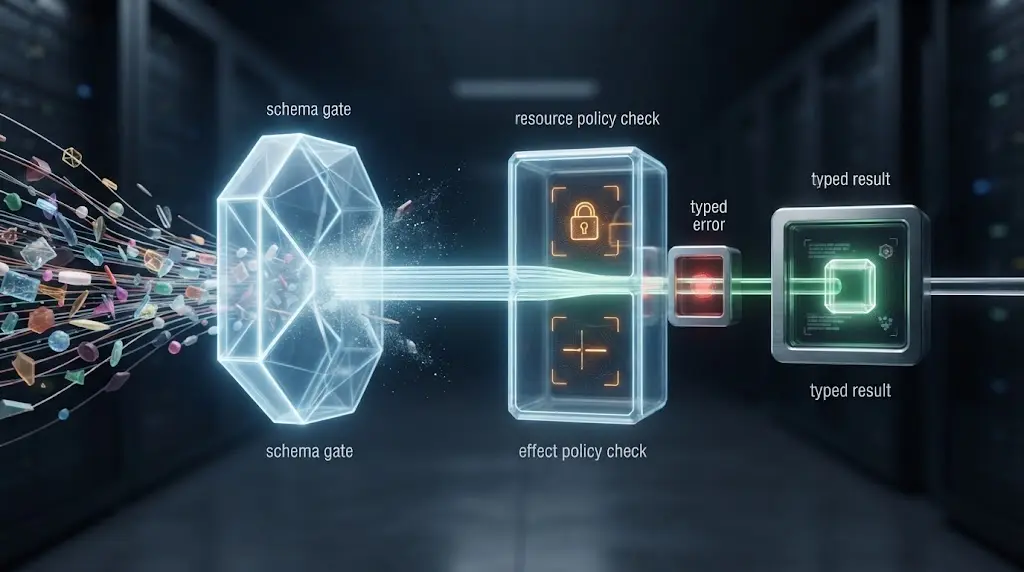
How do you validate MCP tool inputs and outputs?
Validate at the server boundary even when the MCP client advertises a JSON Schema. The model can produce invalid values. A client can be buggy. A proxy can alter a request. A malicious tool can return content that is syntactically valid but operationally dangerous.
The current MCP tools specification defines an input schema and an optional output schema for tools. It says servers must produce structured results that conform to an advertised output schema and clients should validate structured results (MCP Tools). Use both schemas, but do not make the client's validation your only line of defense.
A useful validation pipeline is:
- Parse the JSON-RPC message with a strict parser.
- Confirm the method is allowed for the current transport and protocol version.
- Validate the tool name against the approved inventory.
- Validate the argument object against a strict schema.
- Normalize paths, URLs, identifiers, encodings, and case before policy evaluation.
- Apply resource, tenant, and effect policy to the normalized values.
- Enforce size, time, concurrency, record-count, and outbound-data limits.
- Execute the smallest internal operation that satisfies the tool contract.
- Validate, redact, and size-limit the result before returning it to the model.
- Log the policy decision and outcome without logging secrets or unnecessary content.
For JSON Schema, consider additionalProperties: false when the contract is closed, explicit enums for operations and resource types, maximum string lengths, bounded arrays, and formats that your implementation actually checks. A schema is not a sanitizer. A string that matches uri can still point to a private IP. A path that is syntactically valid can still escape a permitted directory.
Normalize before comparing. For a file tool, resolve the path and verify the final path stays under an approved root. For a URL tool, parse the hostname, resolve DNS according to your network policy, reject private and link-local destinations, and decide how redirects are handled. For an account tool, derive the tenant and subject from verified identity rather than trusting tenant_id supplied by the model.
Validate outputs too. A tool result may contain a URL, a file path, HTML, a command fragment, or an instruction aimed at the agent. Return a structured object such as:
{
  "status": "ok",
  "data": [],
  "source_ids": [],
  "warnings": [],
  "next_action": null,
  "expires_at": "2026-08-19T12:00:00Z"
}
The field names are an example contract, not a standard. Keep the result small enough to inspect. Put large content behind a resource identifier with an access check rather than returning an unbounded blob into context.
Failure should be visible and typed. Return invalid_argument, not_authorized, not_found, policy_denied, upstream_unavailable, or needs_approval where those distinctions help the host respond safely. Do not return “success” with an empty result when the tool failed. False success makes the agent retry the wrong thing or report completion when nothing happened.
How do you prevent SSRF and unsafe outbound calls?
Any MCP tool that fetches a URL, follows an OAuth metadata endpoint, resolves a resource link, or calls an upstream service can become an SSRF path. The current MCP security guidance specifically warns that a malicious server can influence OAuth-related URLs and lead a client toward internal IPs, cloud metadata endpoints, localhost services, DNS rebinding, or redirect chains (MCP Security Best Practices).
The simplest safe design is to avoid arbitrary URL fetch tools. Replace fetch_url(url) with a source catalog:
approved_sources:
  - id: company_status_page
    hostname: status.example.com
    schemes: [https]
    paths: [/incidents, /history]
    methods: [GET]
    max_bytes: 2000000
    follow_redirects: false
If a general fetcher is unavoidable, place it behind a dedicated egress service. Apply controls at multiple layers:
- accept only
httpsin production unless a documented loopback exception is needed; - parse URLs with a standard library, not string checks;
- reject loopback, private, link-local, reserved, and cloud metadata ranges where the deployment does not explicitly need them;
- resolve and validate every redirect destination, or disable redirects;
- account for DNS rebinding by applying network policy at connection time, not only at initial parsing;
- restrict HTTP methods, headers, response size, content types, and timeout;
- block access to instance credentials and internal admin interfaces;
- route egress through a proxy with domain and IP policy when possible;
- log destination, policy decision, response class, and byte count without logging sensitive payloads.
Do not treat a hostname allowlist as complete if the server follows redirects or the network can resolve the hostname to a private address. Do not treat TLS as proof that the destination is safe. TLS authenticates a certificate subject under the trust model. It does not tell you whether that server is inside the intended data boundary.
A URL allowlist is incomplete until redirects and resolved IPs are subject to the same policy.
The same rule applies to MCP OAuth discovery. Validate the authorization server metadata and redirect targets before fetching them. The current guidance recommends HTTPS for production OAuth-related URLs, blocking private and reserved ranges as appropriate, and avoiding blind redirect following (MCP Security Best Practices).
How do you isolate a local MCP server?
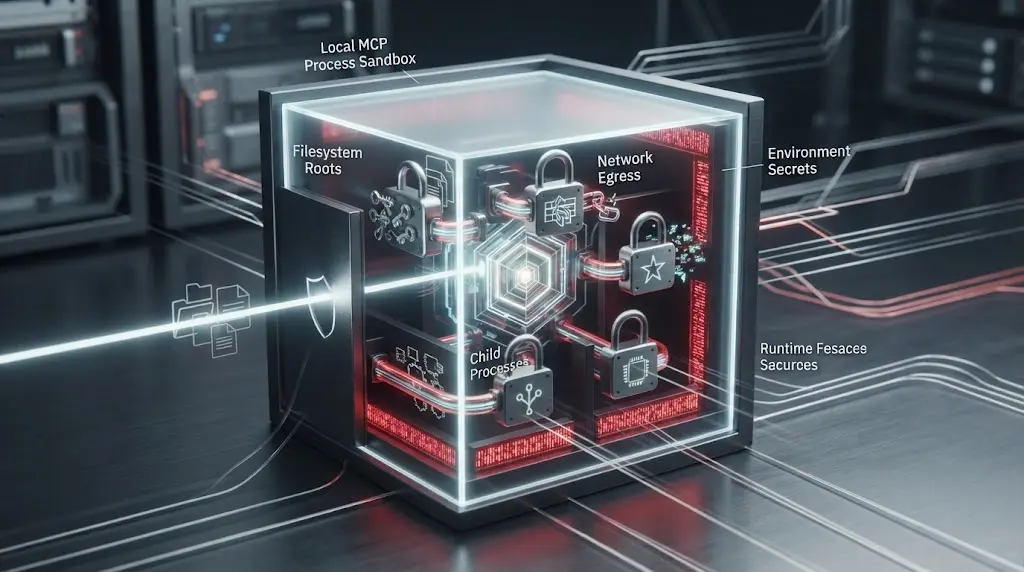
Assume a local MCP server is untrusted code until you have reviewed and contained it. A local server may be downloaded from a package registry, launched through a client configuration, or written by an internal team. It can inherit filesystem, network, environment, and process privileges from the client.
The security boundary should include:
| Area | Default posture | Exception process |
|---|---|---|
| Filesystem | No access, or one read-only workspace | Grant an explicit directory and mode |
| Network | Disabled | Allow named destinations and methods |
| Environment | Empty environment | Inject one short-lived secret through a secret store |
| Process | Non-root, restricted user | Document why a stronger identity is needed |
| Child processes | Denied | Allow one fixed executable or task runner |
| Resource use | CPU, memory, time, and output limits | Set a measured upper bound |
| Secrets | Never in prompts, tool results, or logs | Use runtime secret access with audit |
Use a container, application sandbox, VM, or operating-system policy appropriate to your platform. Keep the command and package version pinned. Review install scripts and transitive dependencies. Prefer a server that exposes one narrow capability over a general command server.
The current MCP security guidance says local servers should run with minimal default privileges, restrict filesystem and network access, and provide explicit mechanisms for granting additional privileges. It also warns that local servers can be compromised through malicious startup commands or malicious payloads (MCP Security Best Practices).
If an HTTP server runs on a developer laptop, “localhost only” is a useful reduction, not a complete defense. Validate the Host header, require an authorization token where the transport is reachable by more than the intended client, and consider a Unix domain socket or another restricted IPC mechanism. Do not let a browser-originated request reach a local write-capable server without an explicit design for origin, authentication, and CSRF.
For local filesystem access, test the boring paths first: ../ traversal, symlinks, alternate encodings, absolute paths, hidden credential files, and a path that changes between validation and open. The server should resolve and check the final target under the approved root at the moment it opens the file.
How do you secure state, sessions, and tenant boundaries?
Authentication on the first request does not prove that every later state handle belongs to the same principal. The current MCP security guidance warns that state handles can be guessed or stolen and says the server must not treat possession of a handle as authentication. Bind stored state to the authenticated user, tenant, or workload, use secure random identifiers, and expire handles when the workflow no longer needs them (MCP Security Best Practices).
Use a server-side key such as:
state_key = verified_subject + ":" + opaque_handle
The verified_subject must come from the validated token or workload identity. Do not use a user_id or tenant_id supplied in the tool arguments to choose the state namespace.
For every stateful tool call, check:
- The caller is still authenticated.
- The token is still valid for this MCP server.
- The stored state belongs to the verified subject and tenant.
- The workflow or handle is unexpired and not revoked.
- The requested operation is allowed at the current state transition.
- The action is idempotent or carries a replay key where a duplicate effect is possible.
If the MCP server uses Streamable HTTP session identifiers, follow the current transport rules for generating and handling those identifiers. Do not confuse a protocol session ID with user authorization. The session identifies a conversation or transport relationship. The token and policy decision identify what the caller may do.
Tenant isolation needs a testable invariant: no request may read or mutate a record whose tenant is not derived from and authorized for the current principal. Put the invariant in a data-access layer or policy engine, not only in a prompt. Add a database row-level policy where the storage system supports it. Pass a tenant context from verified identity to the query builder, and reject conflicting caller-supplied tenant values.
State should also be bounded in time, size, and purpose. A workflow handle that remains valid for months and can trigger any tool is a durable capability token. Prefer purpose-specific handles with a short lifetime and an explicit transition graph. Store only the state needed to resume the operation. Do not copy full conversations, raw secrets, or unrelated tenant data into a shared cache.
How do you protect tool definitions and the supply chain?
An MCP connection has a moving capability surface. A server can add a tool, change a description, broaden an input schema, alter an upstream dependency, or publish a new package version. If the client or host silently accepts those changes, the original approval may no longer describe what will run.
OWASP names software supply-chain attacks and tool poisoning as core MCP risks. Its cheat sheet recommends reviewing source and tool definitions, checking package integrity, scanning dependencies, watching for post-install changes, and verifying package names to reduce typosquatting risk (OWASP MCP Top 10, OWASP MCP Security Cheat Sheet).
Create an inventory before connection:
| Inventory item | Evidence to retain |
|---|---|
| Server identity | Repository, publisher, package, version, digest, maintainer |
| Runtime | Base image, OS package list, language dependencies, lockfile |
| Tools | Name, description, input schema, output schema, annotations |
| Resources | URI pattern, data classification, tenant boundary |
| Prompts | Name, content owner, intended use, change review |
| Outbound calls | Domains, methods, credentials, data types |
| Permissions | Files, databases, APIs, queues, secrets, subprocesses |
| Release evidence | Reviewers, scanner results, tests, approval, date |
Canonicalize the tool definition before hashing or comparing it. Include the tool name, description, input schema, output schema, and security-relevant annotations. A hash does not tell you whether a tool is safe. It tells you whether the approved definition changed. A human or policy review still decides whether the change is acceptable.
For code dependencies, use a lockfile, verify package provenance and checksums where supported, scan for known vulnerabilities, and rebuild from a controlled source. Do not install a package because its name resembles the server you intended to use. Do not allow a web page, prompt, or tool result to trigger installation or configuration changes.
Re-prompt for approval when a new tool or security-relevant schema change appears. Keep old and new definitions available in the audit record. When a release is rolled back, revoke credentials or handles minted by the bad version if their scope or behavior could have been affected.
What should you log and alert on?
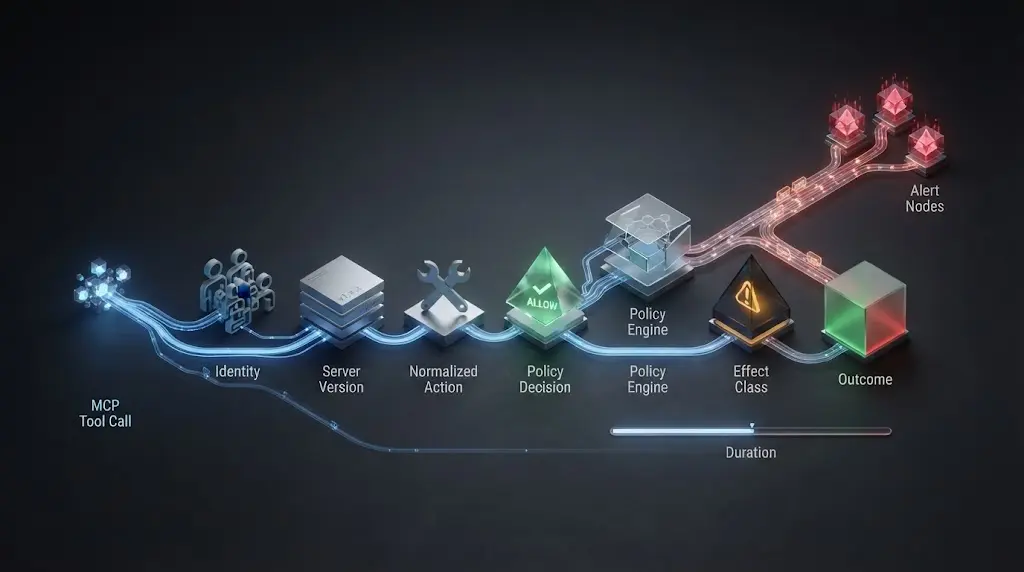
Log enough to answer who called what, where, with which version, under which policy, and with what effect. Do not log raw tokens, passwords, private keys, full prompts, or unnecessary customer content. The MCP security cheat sheet recommends logging tool invocations with parameters, user context, and timestamps while redacting secrets and personal data (OWASP MCP Security Cheat Sheet).
For each call, record a structured event similar to:
{
  "event": "mcp_tool_call",
  "request_id": "opaque-request-id",
  "server_id": "crm-mcp-prod",
  "server_version": "release-digest",
  "tool": "read_customer_orders",
  "subject": "hashed-subject",
  "tenant": "tenant-id-or-hash",
  "resource": "customer-orders",
  "argument_digest": "sha256-of-normalized-arguments",
  "policy": "allow|deny|approval_required",
  "effect": "read|draft|write|external_send",
  "status": "success|error|timeout|cancelled",
  "duration_ms": 0,
  "bytes_out": 0,
  "timestamp": "2026-08-19T12:00:00Z"
}
The values are placeholders in a schema example, not production evidence. Replace them with your event model and retention policy. The useful fields are identity, version, normalized action digest, policy decision, effect class, status, and timing.
Alert on changes and patterns, not just failures:
- a tool appears that was not in the approved inventory;
- a tool definition changes outside a release window;
- a token is presented for the wrong audience;
- a principal requests a new scope repeatedly;
- a read tool attempts an outbound write or a write tool targets a new tenant;
- a URL tool targets private, link-local, or unexpected domains;
- a local server starts with a new command or environment variable;
- a call rate, output size, retry count, or failure class exceeds its budget;
- policy evaluation is unavailable and the server attempts to proceed;
- one account or tenant appears in another tenant's state or result.
Logs are not a substitute for controls. They are the evidence that tells you whether controls fired, where they failed, and whether an incident needs containment.
Which failure modes should you design for?
A checklist that only describes the happy path will miss the moments when agents become dangerous. Use failure modes to decide where the server must fail closed, where it can return a retryable error, and where a human should take over.
| Failure mode | What goes wrong | Required response |
|---|---|---|
| Wrong-audience token | A token for another API is accepted | Reject before tool logic; never pass it upstream |
| Scope creep | A read identity gains write access during a retry | Deny and require explicit step-up authorization |
| Tool poisoning | Description or result contains instructions that alter intent | Treat as untrusted; keep policy outside model context |
| Tool rug pull | Definition changes after approval | Pause, diff, review, and re-approve |
| Confused deputy | Server uses its own broad credential for a caller | Bind upstream action to the caller and purpose; use separate credentials |
| SSRF | Model-controlled URL reaches an internal service | Parse, resolve, allowlist, egress-filter, and reject unsafe destinations |
| Path traversal | A valid path escapes the approved root | Normalize and check the resolved target before open |
| State hijacking | A stolen handle reaches another user's workflow | Bind state to verified identity and expire it |
| Partial side effect | The agent retries after a write whose result is unknown | Check effect status or use idempotency before retry |
| Dependency tampering | A package or startup command changes server behavior | Pin, verify, scan, review, and roll back |
| Log leakage | Tokens or private content enter traces | Redact at the event builder and test the redaction |
| Policy outage | The server runs when the authorization service is down | Fail closed for protected operations |
The critical habit is to separate “the model asked” from “the server is allowed.” The model may ask for a tool. The server evaluates identity, resource, policy, and effect. If the policy service is unavailable, the safe result for a write operation is not “try anyway.”
For partial side effects, make the tool contract explicit. A create operation should accept an idempotency key or expose a way to query whether the operation committed. A send operation should return a durable provider ID. A filesystem write should use a temporary file and an atomic rename where appropriate. These are application design choices, not special MCP features, but agents make retry ambiguity more likely because the model may not know whether a timeout happened before or after the side effect.
If you already use a release gate such as how to evaluate an AI agent, add these MCP-specific cases to it. If the tool is not idempotent and the result is ambiguous, require a read-back or human review before another write.
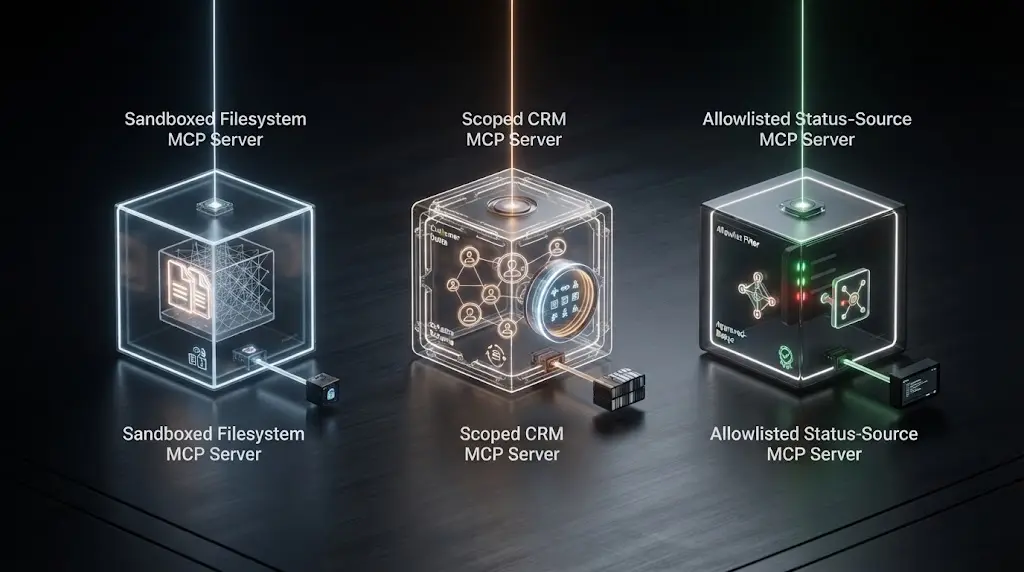
What does a secure MCP server look like in three worked examples?
Example 1: local filesystem server
The job is to let an agent read project documentation and create drafts in one workspace. It does not need to read the home directory, SSH keys, package caches, or arbitrary paths. It does not need network access.
The secure shape is a local stdio process launched with a pinned command, an empty or minimal environment, read-only access to /workspace/docs, write access to /workspace/drafts, no child processes, and a strict path resolver. The tool surface is read_document and create_draft, not read_file and write_file with arbitrary paths.
The server still needs to defend against path traversal and symlink escape. It should resolve the final target, verify the access mode and approved root, enforce file-size limits, and return structured errors. The host should show the exact path and content destination before a draft is written. A malicious document can still contain an instruction to upload secrets, but the server has no network capability with which to do so.
The release evidence includes the command, package digest, sandbox profile, allowed roots, tool definitions, and a test record for traversal, symlink, oversized file, and denied network cases.
Example 2: remote CRM server
The job is to let an authenticated sales agent read a user's assigned accounts and create a follow-up draft. It must not let the model choose an arbitrary tenant, impersonate a salesperson, or send a message without approval.
The remote server uses HTTPS and OAuth-based authorization. The token is bound to the MCP server resource and validated on every request. The server derives subject, organization, and role from the verified token, then applies policy to read_account or create_follow_up_draft. A customer_id argument is checked against the caller's allowed account set. send_follow_up is either absent or separated behind an approval service that binds approval to the normalized recipient, content, and expiry.
The server does not pass the incoming token to the CRM API unless that token was specifically issued for that upstream resource and the architecture deliberately supports that model. A safer default is to exchange or obtain a separate upstream credential and record the mapping between the user action, MCP request, upstream request, and outcome.
The release evidence includes token audience tests, cross-tenant tests, scope tests, approval-binding tests, audit-event examples, and a failure test with the policy service unavailable.
Example 3: remote source fetch tool
The job is to retrieve incident pages from a known set of vendor status sites. A general fetch_url tool would create an SSRF surface. The server instead exposes read_status_source(source_id), resolves source_id through a server-owned catalog, permits only GET, limits response size, validates the destination, and returns extracted fields plus provenance.
The tool result contains the source ID, retrieval time, title, incident text, and a warning if content is incomplete. It does not return raw headers, credentials, arbitrary HTML, or instructions that could be mistaken for system policy. The egress service blocks private ranges and metadata endpoints even if a future code change accidentally widens URL input.
The release evidence includes catalog review, redirect behavior, DNS resolution tests, private-IP rejection, response-size limits, timeout behavior, and output redaction.
These examples show the same pattern: remove generality from the tool, derive identity from trusted context, validate normalized arguments, and keep the effect smaller than the model's raw capability.
Can you use a copy-paste security gate before production?
Yes. Use a gate that produces evidence instead of a vague security score. The following YAML is an implementation artifact. It is not a drop-in policy engine, an MCP standard, or a report of a test I ran. Adapt the names, claims, tools, and controls to the actual server.
mcp_security_gate:
  server:
    id: "replace-with-stable-server-id"
    transport: "stdio | streamable_http"
    environment: "development | staging | production"
    owner: "team-or-person"
    source: "repository-or-package-reference"
    version: "release-version-and-digest"

  boundary:
    remote_endpoint: "https://mcp.example.com/mcp"
    tls_required: true
    allowed_clients:
      - "approved-client-id"
    allowed_networks:
      - "approved-network-or-egress-policy"
    local_sandbox:
      filesystem: "explicit-roots-only"
      network: "disabled-or-explicit-egress"
      child_processes: "denied-or-fixed-allowlist"
      runtime_identity: "non-root-restricted-identity"

  identity:
    auth_scheme: "oauth_resource_server | local_process_boundary"
    issuer: "validated-issuer"
    audience: "canonical-mcp-resource-uri"
    token_location: "authorization_header"
    token_passthrough: false
    tenant_claim: "verified-tenant-claim-or-derived-context"
    state_binding: "verified-subject-and-tenant"

  capabilities:
    approved_tools:
      - name: "read_example"
        mode: "read"
        scopes: ["example:read"]
        resources: ["approved-resource-set"]
        approval: "none"
        max_records: 25
        max_runtime_seconds: 30
      - name: "write_example_draft"
        mode: "draft"
        scopes: ["example:draft"]
        resources: ["drafts-only"]
        approval: "required"
        idempotency_key: true
        max_runtime_seconds: 30
    default_tool_policy: "deny"
    unknown_tool_policy: "deny-and-alert"
    schema_policy:
      additional_properties: false
      validate_inputs: true
      validate_outputs: true
      max_string_lengths: true
      bounded_arrays: true

  content:
    tool_descriptions_reviewed: true
    annotations_treated_as_untrusted: true
    tool_results_treated_as_untrusted: true
    raw_html_returned: false
    secrets_in_context: false
    cross_server_data_flow_reviewed: true

  egress:
    arbitrary_url_fetch: false
    allowed_domains: ["approved.example.com"]
    reject_private_and_link_local_ips: true
    follow_redirects: false
    methods: ["GET"]
    max_response_bytes: 2000000
    timeout_seconds: 10
    egress_proxy: "required-or-not-applicable"

  change_and_supply_chain:
    dependencies_locked: true
    dependency_scan: "artifact-reference-and-date"
    package_provenance_reviewed: true
    tool_inventory_hash: "hash-of-canonical-approved-definitions"
    definition_change_policy: "pause-diff-review-reapprove"
    rollback_reference: "known-good-release"

  evidence:
    auth_tests: "artifact-reference"
    cross_tenant_tests: "artifact-reference"
    invalid_input_tests: "artifact-reference"
    ssrf_and_path_tests: "artifact-reference"
    sandbox_tests: "artifact-reference"
    approval_tests: "artifact-reference"
    audit_event_sample: "artifact-reference"
    policy_outage_behavior: "fail-closed-evidence"

  decision:
    status: "approve | remediate | do_not_connect"
    reviewer: "named-reviewer"
    reviewed_at: "2026-08-19T00:00:00Z"
    expiry_or_next_review: "date"
    unresolved_risks: []
Use remediate when a control is missing but the server is not yet connected to sensitive systems. Use do_not_connect when the server cannot prove who it is, what it can reach, or whether its write path is bounded. Use approve only when the evidence matches the actual deployed artifact, not a local branch or an old tool inventory.
How should you test the gate without fooling yourself?
Test the server as a security boundary, not only as a protocol implementation. A successful initialize handshake proves very little. A tool can return valid JSON while leaking another tenant's data. An OAuth flow can complete while accepting a token for the wrong audience. A path tool can pass normal examples while escaping through a symlink.
Build test cases around invariants:
| Invariant | Test cases |
|---|---|
| Only authenticated callers reach protected tools | Missing, expired, malformed, wrong-issuer, wrong-audience, revoked token |
| Scope maps to effect | Read token calls read tool; same token cannot write or send |
| Tenant cannot cross data boundary | Caller A requests caller B's ID, state handle, resource, and error detail |
| Tool inventory is stable | New tool, changed description, broader schema, changed output, unexpected annotation |
| Inputs stay inside policy | Extra fields, long strings, invalid enum, path traversal, symlink, private URL |
| Outputs cannot widen authority | Instruction-like tool result, raw HTML, secret-shaped value, oversized result |
| Runtime is contained | Child process, filesystem escape, network attempt, resource exhaustion |
| Retries do not duplicate effects | Timeout after commit, duplicate idempotency key, replayed request |
| Approval means the exact action | Changed recipient, target, amount, scope, tool, or expiry after approval |
| Failure closes the door | Policy outage, dependency failure, malformed metadata, audit sink failure |
For each test, record the server version, client version, tool inventory digest, identity, input, expected policy decision, actual outcome, and whether an audit event was emitted. Do not call one green test a security proof. The point is to create evidence that the boundary behaves as designed across normal, invalid, adversarial, and unavailable conditions.
Do not use synthetic success rates unless you actually ran and documented the test set. This article gives the protocol and test categories. It does not claim a benchmark for any MCP SDK, model, or server.
You can use a staged environment with fake records and non-routable test destinations. Keep production credentials out of the test. For a write tool, prefer a dry-run endpoint or a reversible sandbox. For a local server, test under the same sandbox profile used in production. For a remote server, test through the same gateway, egress proxy, and identity provider.
When should you connect an MCP server to an AI agent?
Connect only after the server can answer six questions with evidence:
- Boundary: Where does the server run, what can it reach, and how can it stop?
- Identity: Which principal is calling, how is the token validated, and what is the audience?
- Capability: Which exact tools and resources are allowed, and which are denied by default?
- Content: Which descriptions, prompts, and results are untrusted, and how is their influence contained?
- Containment: What prevents SSRF, path traversal, command execution, data overflow, and duplicate side effects?
- Evidence: Which code, dependencies, definitions, logs, alerts, and tests prove the current posture?
If the answer to any question is “the model will follow the instruction,” the server is not ready for a sensitive connection. Model behavior can help a safe design. It cannot replace authentication, authorization, sandboxing, egress control, or an audit trail.
For a read-only internal knowledge server, the gate may be lighter than for a production payment or deployment server. The controls still need to match the data and effect. Read-only does not mean harmless if the server can expose secrets, cross tenant boundaries, or feed poisoned content into a more privileged agent.
Make rollout progressive:
- Start with one approved client and one non-sensitive resource.
- Expose read-only tools before draft or write tools.
- Put the server behind a policy layer and collect audit events before broad access.
- Add one tool at a time, reviewing the definition and data flow.
- Keep a kill switch that blocks the server or specific tool without redeploying the agent.
- Review alerts and denied calls during the first release window.
- Re-run the gate when the protocol version, server code, dependency lockfile, tool schema, identity provider, or upstream API changes.
The release decision is not “can the agent call the server?” It is “can the system prove that the agent can call only the intended capability, for the intended principal, with the intended effect, and stop when that proof disappears?”
The safest MCP rollout starts with the smallest useful tool surface and expands only when each new capability has its own evidence.
Marius Manolachi's site is not the place to pretend a checklist makes a server invulnerable. It is a place to make the boundary concrete enough to review. Apply the gate to the actual deployment, keep the current MCP and OWASP guidance in your review bundle, and do not connect a server whose identity, authority, or side effects remain ambiguous.
Continue with a related field note
Questions people ask next
Does every MCP server need OAuth?
Not every server needs OAuth. The MCP authorization specification is for HTTP-based protected servers, while local stdio servers generally use the client process and its environment. Any remote server that protects user or business data still needs authenticated requests, authorization, and transport security.
What is the most important MCP server security control?
Make the server enforce identity and authorization outside the model. Validate the token audience, scope each tool and resource, normalize arguments, and reject calls that are outside the authenticated principal’s permitted boundary.
Can prompt injection be fixed in the MCP server alone?
No. The server can reduce impact by treating tool inputs and outputs as untrusted, validating schemas, limiting tools, and requiring approval for high-impact actions. The host and agent also need prompt-injection defenses and a policy layer.
Should an MCP server run locally or remotely?
Use local stdio when one trusted client needs a narrow tool and process isolation is practical. Use remote HTTP when multiple users or agents need a service boundary, centralized authorization, and audit. Neither choice is secure by itself.
How do I test whether an MCP server is safe to connect?
Review its source and dependencies, record the tool and schema inventory, verify authentication and authorization, test invalid and cross-tenant arguments, probe SSRF and path traversal controls, check sandbox limits, and confirm logs and stop conditions before enabling write tools.